Feature
The letter reaches both homes, and the teacher never hands out their number.
Reviewed on
The short answer
Auladia keeps communication between school and families inside the app and the portal: notices and letters home with attachments, messages between teacher and family without sharing a personal phone number, parent meetings and trip consent forms signed on a phone.
Each parent has their own access and notifications, no teacher can hold a private conversation with a pupil under 18, and notifications show no personal data on the lock screen. The app and the management screens are in Catalan and Spanish.
Notices and letters home: who has read and who has confirmed
- The school office or the head writes the letter and attaches documents, as PDFs or photos. Each file goes through the antivirus before it is sent.
- The family receives it in the app and the portal. The phone says “New notice from school” and nothing more: the content is read inside the app, signed in.
- Opening it marks it as read. If the letter asks for it, the family taps to confirm they have read it, which is a separate step.
- The attachments open or download together, and the school has a record of who has read the letter and who has confirmed it.
Each person can set quiet hours: notifications that are not emergencies wait until the quiet hours end, and are not lost. It follows the staff right to digital disconnection in Spain’s data protection act, Art. 88.
Messages between teacher and family, inside the school’s system
The AEPD guide for schools says communication between teachers and families should preferably use the channels the school provides, and advises against instant messaging apps between teachers and families or pupils.
- The teacher messages the family from the pupil’s record or the register. They do not see the family’s phone number or email, and the family does not see theirs.
- Teachers can only message the families of pupils they currently teach.
- No teacher can hold a private conversation with a pupil under 18: the legal guardians get a copy, or the conversation is with a group, and the screen says so.
- If there is a complaint or a pupil needs protecting, the head can read a conversation, thread by thread and with a stated reason, and the access is logged.
Reporting, muting or blocking a conversation
When a family receives an offensive message, they can report it to the school’s leadership, not to the other person: they pick a reason and can add an explanation. They can also mute a conversation’s notifications or block it, and then neither they nor the teacher can write until they unblock it. Teachers and lunchtime supervisors have the same options on their side.
The head and the head of studies are notified without the text and deal with it in the reports tray: they read the message, with the reading logged, and decide once. They can hide the message, warn its author, stop the author writing in that conversation for up to 30 days, lift the block or dismiss the report.
Letters home and conversations with the school office or the head cannot be muted or blocked: a family cannot cut itself off from the school’s official channel.
Parent meetings: time slots, one-to-ones and the class meeting
Catalan Decree 175/2022, Art. 24.18, requires at least one individual meeting at the start of each stage, another during every school year and a group meeting at the start of each year.
- Laia Serrat, the Year 5 A tutor, publishes meeting slots, in person or online, for the families of her pupils.
- Each family books one in the app. If the parents live apart, each books their own and does not see the other’s.
- The day before, the family gets a reminder, and the meeting appears in their calendar.
- Afterwards, Laia writes an internal summary, which the family never sees, and the agreed actions, which she can share.
- Her class view shows which pupils have had this year’s meeting, which have one booked and which have not, and she records the class meeting there.
Trip consent forms signed on a phone
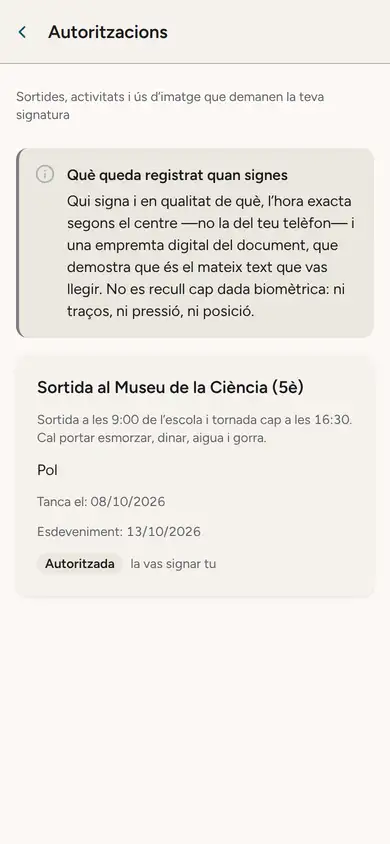
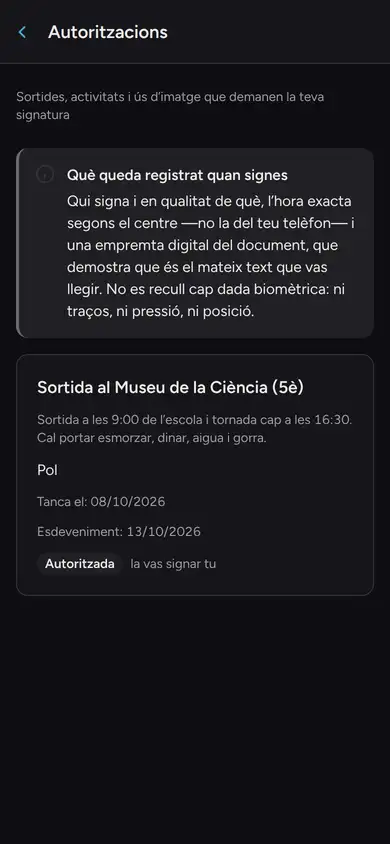
The Year 5 trip to the Science Museum reaches the apps of Rosa Sánchez and Marc Rovira, Pol’s parents, who live apart. Rosa signs it. Marc’s phone shows it as authorised and answered, without saying who signed or when.
Signing records who signed and in what capacity, the school’s clock time and a fingerprint of the document, with no biometric data. A parent stripped of parental authority cannot sign, and signing needs a connection.
Under the Civil Code of Catalonia, Art. 236-8, for acts that one person normally carries out alone, either parent may act on their own. The guide for separated parents explains how this works.
Frequently asked questions
Does the teacher have to give families their phone number?
No. They talk to the family through messages in Auladia, and neither side sees the other’s phone number or email.
Can a teacher message a pupil under 18 privately?
No. The pupil’s legal guardians get a copy, or the conversation is with a group, and everyone in it sees this on screen.
If the parents are separated, do both get the letters home?
Yes. Each parent has their own access and notifications, unless a court order says otherwise. The guide for separated parents has the detail.
Do both parents need to sign a consent form for a trip?
For an ordinary trip one signature is enough, and the other parent sees it is settled. For an exceptional act, such as a trip abroad, both must consent, and that second signature still has to be collected outside the app.
What can a family do about an offensive message?
Report it to the school’s leadership from the message itself, and mute or block the conversation. The leadership reviews it and decides, and the person who reported it is not exposed to the other side.
What about families who do not use the app?
Today notices reach the app and the web portal. Email and text messages for families who do not use the app are being prepared: follow their progress on Coming next.
What Auladia does
Notices and letters home with attachments, read status and confirmation. Teacher and family conversations without phone numbers, with legal guardians copied in when the pupil is under 18. Reporting, muting and blocking, with a tray for the school’s leadership. Parent meetings with time slots, reminders, agreed actions and a count of each class’s meetings. Trip consent signed on a phone, with a record of who signed.
Notifications say “New notice from school” and nothing more, and each person chooses their quiet hours. The security page explains how children’s data is protected.
The app for iPhone, iPad and Android is in pilot, and it is in Catalan and Spanish. Email and text messages for families who do not use the app are being prepared, and a consent form that requires both parents’ signatures cannot be set up yet.
Families with AuladiaSources
The rules and official documents this page cites.
- Guide for schools (Spanish) Spanish Data Protection Agency (AEPD)
- Decree 175/2022 on basic education, article 24.18 (Catalan) Portal Jurídic de Catalunya
- Law 12/2009 on education (Catalonia), article 25 (Spanish) BOE
- Law 25/2010, Book Two of the Civil Code of Catalonia, article 236-8 (Spanish) BOE
- Organic Law 3/2018 on data protection and digital rights, article 88 (Spanish) BOE
This page describes what Auladia does on the review date; what it does not do yet is on Coming next. Published on .
Want to see it on screen?
In the demo we show you how Auladia handles it with a made-up school’s data, and what it does not do yet.
Request a demo